2.8 KiB
Files handling
This document describes how files are handled in this appication.
Types of files
static files: files that are not changed by the application, e.g. images, fonts, etc.¨
content documents:
Files that belong to the content and are managed by the content editors in the CMS (pdf, excel, word, etc.)
user documents:
Files that are uploaded by the users (pdf, etc.). Therefore not visible in the CMS. Images are handled seprately from documents since images require additional processing (resizing, cropping, etc.). Visible in the django admin.
content images:
Images that belong to the content and are managed by the content editors in the CMS.
user images:
Images that are uploaded by the users. Therefore not visible in the CMS. Visible in the django admin.
Static files
These files are publicly served on S3.
Content documents
These files are part of the content. Such as a pdf thas cointains additional information to a course. These files are not publicly available. The content files are uploaded by the editors in the wagtail cms.
https://www.hacksoft.io/blog/direct-to-s3-file-upload-with-django
Django handles the permissions to these files. Via a view django checks if the user has permissions to access the file, and gerates a temporary url that is valid for a limited time. Still the documents are served by django. This done for usability reasons. The user sees the url mydomain.com/media/documents/ and not a url to S3. Therefore the user can share the url with other users. (still they need to login and have the permissions to access the file)
The downside of this is that the django server processes these files. (could be circumvented by django-sendfile).
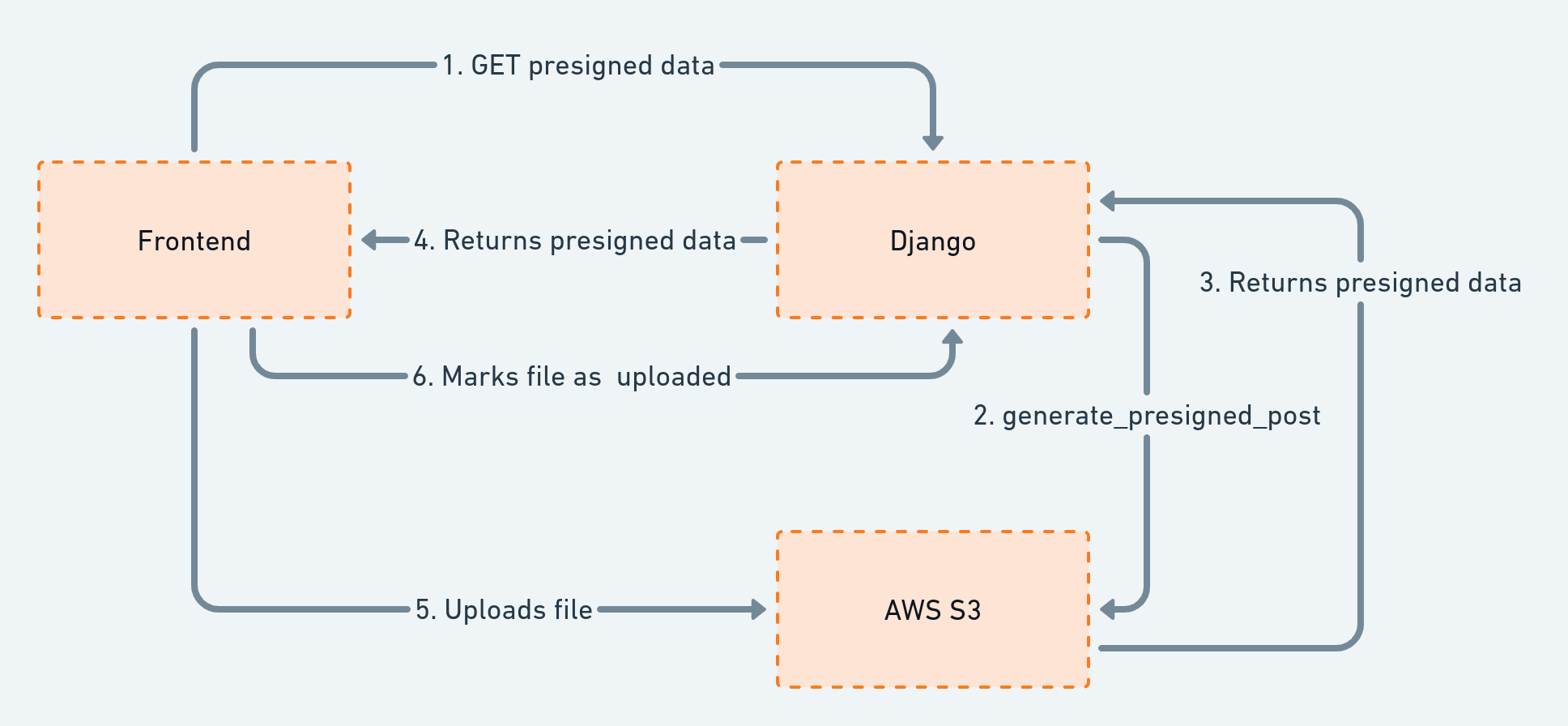
- These Files are handled stored as wagtail documents. As a model and the file itself is stored in S3.
Frontend access to content documents
For the frontend django generates a fixed url per file /media/documents/
When the frontend requests this file, django checks if the user has permissions to access the file. If so, django generates a temporary url that is valid for a limited time. Then sends a redirect to the frontend.
In this waz the frontend does not need to know about the permissions. Content grapql can be cached if needed and urls can be shared by the users.
content_documents user_documents
public files
User documents
- User uploaded files are stored in S3. but the permissions is handled by django. Same process as content files.
Same process as content files. But the url is /media/user-uploads/ And the files are not managed by Wagtail. Due to another model, they are not visible to the user in the CMS.
Content images
Content Images are served directly from S3. The permissions are handled by dja