 Ramon Wenger
a379650367
Ramon Wenger
a379650367
|
||
|---|---|---|
| .azure | ||
| .git-crypt | ||
| client | ||
| compose/django | ||
| cypress | ||
| docs | ||
| env | ||
| env_secrets | ||
| scripts | ||
| server | ||
| .dockerignore | ||
| .editorconfig | ||
| .gitattributes | ||
| .gitignore | ||
| .npmrc | ||
| .tool-versions | ||
| README.md | ||
| bitbucket-pipelines.yml | ||
| caprover_cleanup.py | ||
| caprover_create_app.py | ||
| caprover_deploy.sh | ||
| currents.config.js | ||
| cypress.config.mjs | ||
| docker-compose-local.yml | ||
| example.env | ||
| format_code.sh | ||
| git-crypt-encrypted-files.txt | ||
| git-pre-commit.sh | ||
| git-pre-push.sh | ||
| package-lock.json | ||
| package.json | ||
| prepare_server.sh | ||
| prepare_server_cypress.sh | ||
| requirements.txt | ||
| start_sftpserver.sh | ||
| trufflehog-allow.json | ||
| trufflehog-exclude-patterns.txt | ||
README.md
VBV Lernwelt
Project setup is based on cookiecutter-django project template.
Run for development
# run vue vite dev server
cd client && npm run dev

# reset db and run django dev server
./prepare_server.sh

# if you only want to create some specific courses to speed up the script,
# you can use the '--courses' parameter
# see consts.py for available course ids
# ./prepare_server.sh --courses -3 -5
Installation
See .tool-versions file for used django and node version
You have to set up at least the following environment variables:
export IT_APP_ENVIRONMENT=local
See .env_secrets/local_daniel.env for more possible environment variables.
Especially set correct values for POSTGRES_* and DATABASE_URL
Install git-lfs
brew install git-lfs
git lfs install
Server part
Install python dependencies:
pip install -r server/requirements/requirements-dev.txt
The "prepare_server.sh" script will create the database according to POSTGRES_*
environment variables.
It will also setup the tables for django and run the django development server.
# will run `migrate` and `runserver` etc...
./prepare_server.sh

# or async server
# uvicorn config.asgi:application --host 0.0.0.0 --reload
Client part
cd client

npm install

# run dev server
npm run dev
General part
Cypress is installed for client and server, so there is this package.json on the project root directory
# in project root directory
npm install
Git hooks
# install pre-push git hook
# add this line to the existing script in .git/hooks/pre-push
./git-pre-push.sh
Actions on Save
You can enable some useful "Actions on Save" in your JetBrains IDE:
Preferences -> Tools -> Actions on Save
- Reformat Code
- Optimize Imports
- Run eslint --fix
- Run prettier
Translations
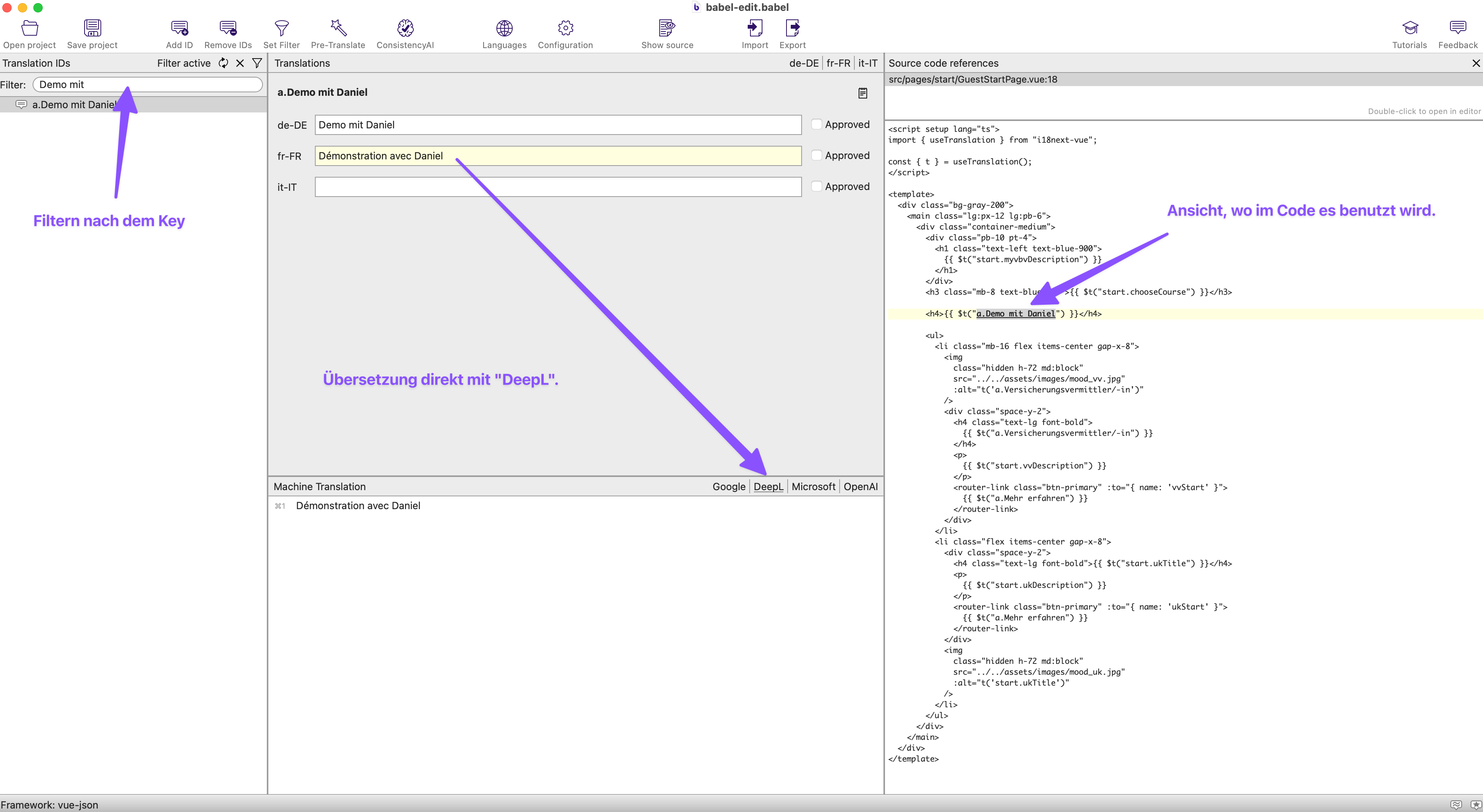
We use the i18next library for translations.
Please add a. prefix for new translation keys in the code:
<h4>{{ $t("a.Demo mit Daniel") }}</h4>
With i18next-parser we can extraxt the
new translation keys directly from the code to the language files in ./client/src/locales.
# extract new translation keys
# in `./client` directory
npm run i18next:parse
The new keys will end up in the ./client/src/locales/de/translation.json file.
You can translate the keys directly in the files.
Bonus: Translate with BabelEdit desktop app
The BabelEdit desktop can help directly with the translation.
Here are the settings that I use in BabelEdit:
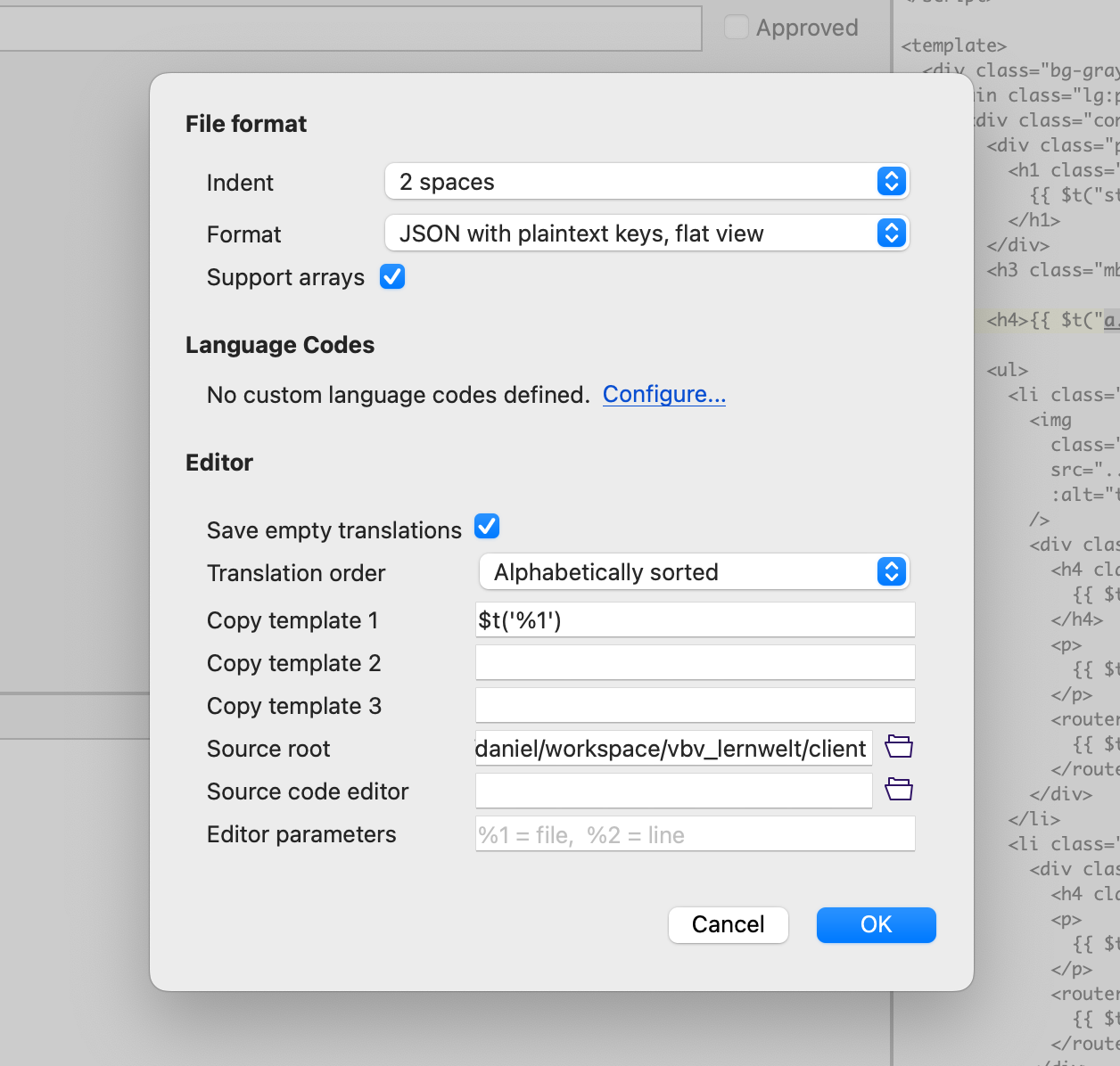
Run the npm run i18next:sort to get a "clean" sorted file after edit with BabelEdit.
"_many" plural form in French and Italian
See https://github.com/i18next/i18next/issues/1691#issuecomment-968063348 for an explanation why this plural form is needed in French and Italian. But not in German and English.
Deployment and Environments
Prod Environment on Azure
Bitbucket Pipelines name: prod-azure https://my.vbv-afa.ch/
Deployment step on Bitbucket Pipelines will build the Docker container for Azure. It seems that right now, you have to make a manual step on Azure to use this new Docker container and update it on Azure. Please ask Lorenz for more information.
Prod Monitoring on New Relic
See docs/new-relic.md
CapRover vbv-develop
Bitbucket Pipelines name: develop https://vbv-develop.control.iterativ.ch/
Deployment happens automatically on every push to develop branch.
CapRover vbv-master
Bitbucket Pipelines name: master https://vbv-master.control.iterativ.ch/ Deployment happens automatically on every push to master branch.
CapRover myvbv-stage
Bitbucket Pipelines name: stage https://myvbv-stage.control.iterativ.ch/ https://myvbv-stage.iterativ.ch/
Deployment happens manually via Bitbucket Pipelines
CapRover myvbv (old prod)
Bitbucket Pipelines name: myvbv https://myvbv.control.iterativ.ch/ https://myvbv.iterativ.ch/
Deployment happens manually via Bitbucket Pipelines
CapRover feature branch deployment
You can deploy every feature branch to CapRover directly from Bitbucket Pipelines with a manual step.
When you run caprover_deploy.sh without arguments, it will deploy the current branch
./caprover_deploy.sh
Cleanup caprover feature branch deployments
# by default it will delete all vbv-feature-* apps
python caprover_cleanup.py

# or specify a specific app regex and delete without confirmation
python caprover_cleanup.py --automated -a 'vbv-bugfix*'
IntelliJ Configuration
- In the .idea/vbv_lernwelt.iml file change the module type to "PYTHON_MODULE".
- Add django facet in "Project Structure".
- Run configuration with "Python -> server.py" to have async debugging support.
Optional
Install the EnvFile Plugin
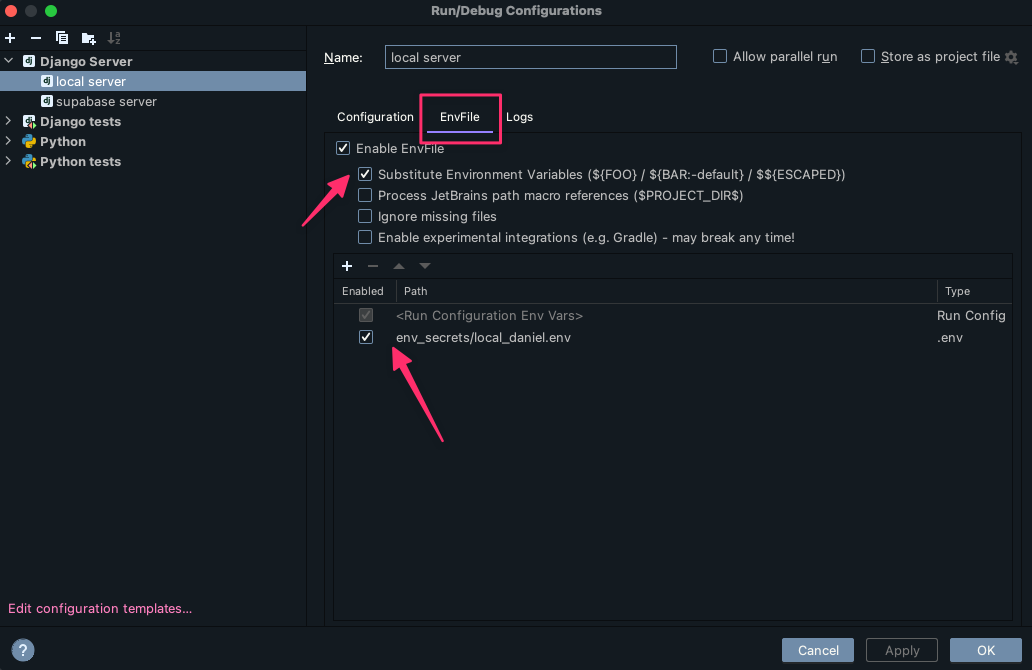
Install the tailwind css Plugin from Jetbrains
currents.dev
This project uses currents.dev to run the Cypress tests
concurrently.
The following steps were taken to set it up:
- Create a new project on currents.dev
- Add the generated
projectIdto the cypress configuration file - Install
@currents/clias a dev dependency - Add the following script to the
package.jsonfile:"cypress:ci": "currents run --parallel --record --key $CURRENTS_KEY", - Create a new Bitbucket pipelines job that exports the
CURRENTS_KEYand runs thecypress:ciscript - Refactor the pipeline steps so that the dependencies are installed first and then the
other steps are run in
parallel.
You can then run multiple instances of the previously created job in parallel.
See.bitbucket-pipelines.ymlfor an example.
💡 The number of cypress worker jobs depends on the number of cypress tests. Too many workers for too few tests will result in a lot of idle workers.
Frontend folder structure
There are some rules when it comes to the folder structure of the frontend.
- Every page should have its own folder in the
pagesfolder. - A page component name must have the
Pagesuffix. E.g.MyPage.vue. - A page is defined by being a routing target.
- The components solely being used in a page should be in the same folder as the page.
📦 client
└─ pages
   ├─ AbcPage.vue
   ├─ AbcButton.vue
   └─ AbcListTile.vue
GraphQL
python manage.py graphql_schema
On the client side you have to run the following command to update the generated code
npm run codegen

# `npm run dev` includes `npm run codegen` as step...
npm run dev
If you run npm run dev, the codegen command will be run automatically in watch mode.
For the ObjectTypes on the server, please use the postfix ObjectType for types,
like LearningContentAttendanceCourseObjectType.
This will prevent problems with the hand written types on the client side,
when npm run codegen will create the types automatically.
When you change something on the server side run the following command to update the graphql schema.
Open Questions
- The
idfield has to be a string? - What about the generated types from
codegen? Hand written types seem to be better. - The functions in
cacheExchangeshould be nearer the concrete implementation...
Load prod data for testing
-
Checkout the vbv-devops repository
-
Change into the
backupsdirectory -
Run
python3 check_vbv_backup.py. This downloads the latest backup from S3 and restores it to thevbv-lernweltdatabase. -
Reset all user passwords. Open
shell_plusin theserverdirectory of thevbv_lernweltrepository and runfor csu in CourseSessionUser.objects.all(): csu.user.set_password("test")