c9bf1d2753
|
||
|---|---|---|
| .git-crypt | ||
| client | ||
| compose/django | ||
| cypress | ||
| docs | ||
| env | ||
| env_secrets | ||
| scripts | ||
| server | ||
| .dockerignore | ||
| .editorconfig | ||
| .gitattributes | ||
| .gitignore | ||
| .pre-commit-config.yaml | ||
| .tool-versions | ||
| README.md | ||
| README_generated.md | ||
| bitbucket-pipelines.yml | ||
| caprover_create_app.py | ||
| caprover_deploy.sh | ||
| cypress.config.js | ||
| docker-compose-local.yml | ||
| example.env | ||
| format_code.sh | ||
| git-crypt-encrypted-files.txt | ||
| git-pre-commit.sh | ||
| git-pre-push.sh | ||
| package.json | ||
| prepare_server.sh | ||
| prepare_server_cypress.sh | ||
| trufflehog-allow.json | ||
| trufflehog-exclude-patterns.txt | ||
README.md
VBV Lernwelt
Project setup is based on cookiecutter-django project template.
Run for development
# run vue vite dev server
cd client && npm run dev

# reset db and run django dev server
./prepare_server.sh

# run tailwind cli (for tailwind support on django templates)
cd client && npm run tailwind
Installation
See .tool-versions file for used django and node version
You have to set up at least the following environment variables:
export IT_APP_ENVIRONMENT=development
See .env_secrets/local_daniel.env for more possible environment variables.
Especially set correct values for POSTGRES_* and DATABASE_URL
Install git-lfs
brew install git-lfs
git lfs install
Server part
Install python dependencies:
pip install -r server/requirements/requirements-dev.txt
The "prepare_server.sh" script will create the database according to POSTGRES_*
environment variables.
It will also setup the tables for django and run the django development server.
# will initial`migrate` and `runserver` etc...
./prepare_server.sh

# or async server
# uvicorn config.asgi:application --host 0.0.0.0 --reload
Client part
cd client

npm install

# run dev server
npm run dev
General part
Cypress is installed for client and server, so there is this package.json on the project root directory
# in project root directory
npm install
Git hooks
# install pre-push git hook
# add this line to the existing script in .git/hooks/pre-push
./git-pre-push.sh
Actions on Save
You can enable some useful "Actions on Save" in your JetBrains IDE:
Preferences -> Tools -> Actions on Save
- Reformat Code
- Optimize Imports
- Run eslint --fix
- Run prettier
Deployment to CapRover
CapRover Dev (vbv-lernwelt.control.iterativ.ch)
# run deploy script
./caprover_deploy.sh vbv-lernwelt

# of vbv-lernwelt is default value
./caprover_deploy.sh
CapRover Stage (myvbv-stage.iterativ.ch)
./caprover_deploy.sh myvbv-stage
CapRover Prod (myvbv.iterativ.ch)
./caprover_deploy.sh myvbv
IntelliJ Configuration
- In the .idea/vbv_lernwelt.iml file change the module type to "PYTHON_MODULE".
- Add django facet in "Project Structure".
- Run configuration with "Python -> server.py" to have async debugging support.
Optional
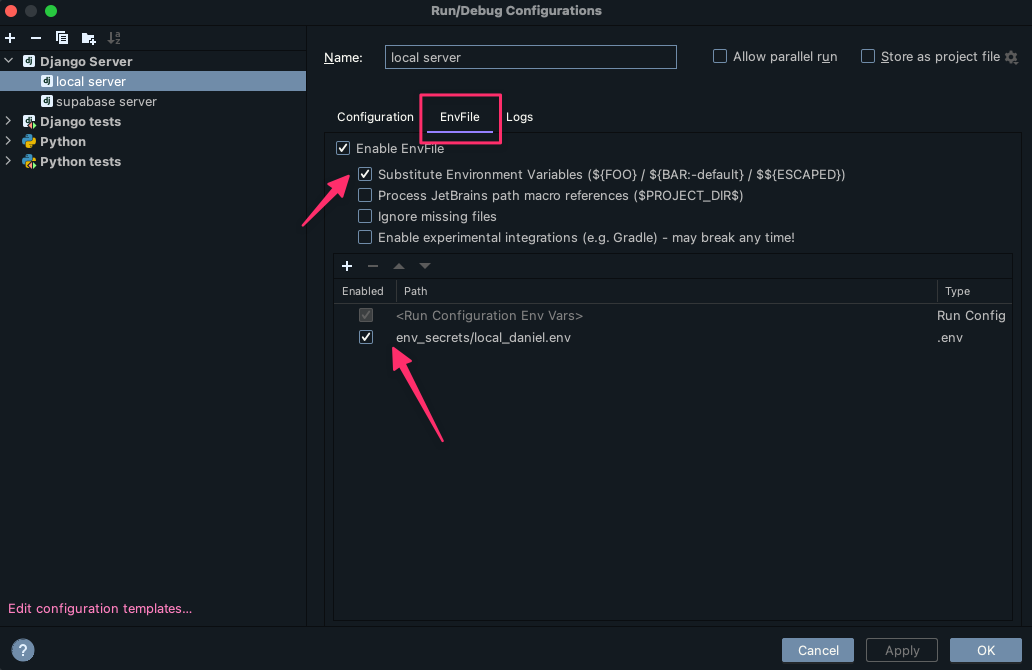
Install the EnvFile Plugin